POST Administration Feature
What you can do
View registrations
See who is registered under your company for the current POST year.
Track completion
Check who has completed training and at which level.
Get records
Download reports and print temporary certificates.

How to generate a certificate report
Sign in at learn.posttraining.ca with your company administrator account, then follow these steps.
1. Open your profile
Select the profile icon in the top-right corner of the site, then choose Profile.
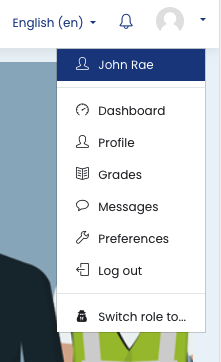
2. Open Certificate Report
On your profile page, find the Reports block and select Certificate Report.
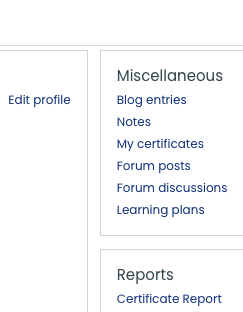
3. Filter by course
Choose the course or courses you want to include, then select Apply.
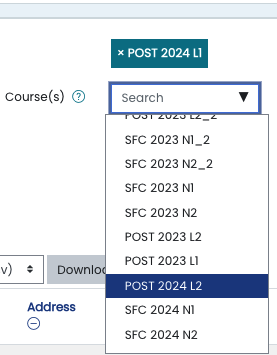
4. Download your results
Download the report or generate the temporary certificates you need. Your browser will usually save the file in your Downloads folder.
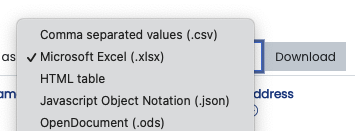
Ce que vous pouvez faire
Consulter les inscriptions
Voyez qui est inscrit sous le nom de votre entreprise pour l'année POST en cours.
Suivre les formations
Vérifiez qui a terminé sa formation et à quel niveau.
Obtenir les documents
Téléchargez des rapports et imprimez des certificats temporaires.

Comment produire un rapport de certification
Connectez-vous à learn.posttraining.ca avec votre compte d'administrateur d'entreprise, puis suivez ces étapes.
1. Ouvrez votre profil
Cliquez sur l'icône de profil dans le coin supérieur droit du site, puis sélectionnez Profile.
2. Ouvrez le rapport de certification
Sur votre page de profil, repérez le bloc Reports et sélectionnez Certificate Report.
3. Filtrez les résultats par cours
Choisissez le ou les cours à inclure, puis cliquez sur Apply.
4. Téléchargez les résultats
Téléchargez le rapport ou produisez les certificats temporaires dont vous avez besoin. Le fichier sera généralement enregistré dans le dossier Téléchargements de votre appareil.